Google makes it harder to cancel subscriptions in the Play Store.
Google Play Market introduces a new subscription management page
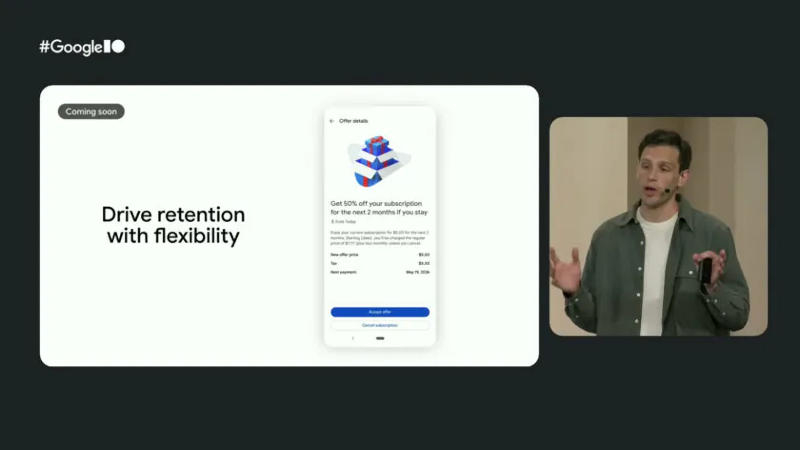
At the Google I/O conference, developers announced the launch of an updated page in the Play Market app that makes canceling subscriptions more convenient, but adds an extra verification step.
What changed
* When attempting to cancel a subscription, the user sees familiar “Cancel” and “Save” buttons.
* Immediately after clicking “Cancel,” the system offers options to switch to a cheaper plan.
This allows developers to offer users a downgrade instead of a full cancellation.
How it works
1. The user clicks the “Cancel Subscription” button.
2. Two buttons appear on screen: “Cancel” and “Save,” along with a list of more affordable plans.
3. If the user selects one of the offered plans, the subscription simply moves to the new level; if they confirm the cancellation – the subscription ends.
What’s next
Google stated that soon the subscription management API will be expanded: developers will be able to change plans directly within their apps. Moreover, this capability will also be integrated into the cancellation process so that users are automatically offered a downgrade before final cancellation.
> “If a user clicks ‘Cancel,’ you can offer them a downgrade option,” said a company representative.
Result
The new mechanism does not overly complicate cancellation: sometimes you have to scroll a bit lower to find the right button. Otherwise, the process remains the same and helps developers reduce cancellations without significantly affecting the user experience. We hope Google won’t take this too far.
 Asted Cloud
Comments (0)
Share your thoughts — please be polite and stay on topic.
Log in to comment