
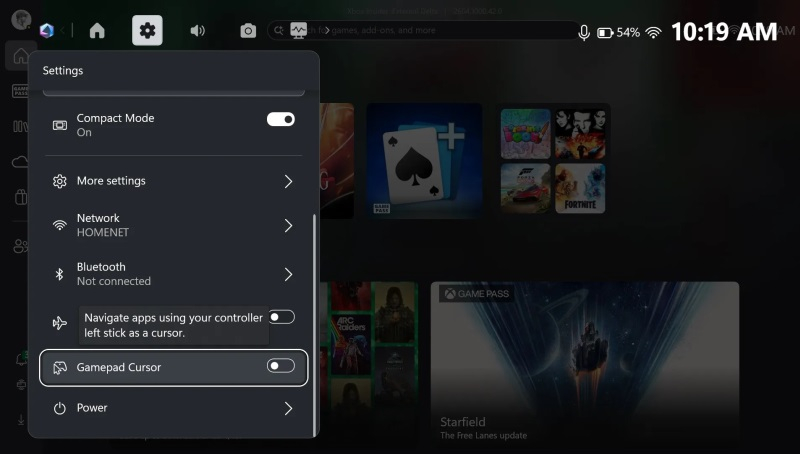
Microsoft introduced the Gamepad Cursor—a virtual mouse for portable consoles running Windows
Microsoft launches a virtual cursor for portable devices with Windows
Microsoft has begun testing a new feature called Gamepad Cursor, which allows the left stick of an Xbox controller to function as a mouse on laptops and other Windows 11 devices.
What is it?
- Gamepad Cursor turns a standard gaming controller into a full-fledged mouse.
- The feature is built directly into the Xbox mode available in Windows 11 and does not require third‑party software.
- You can enable it via the Game Bar – simply toggle the switch you need.
How does it work?
| Control | What it does |
|---|---|
| Left stick | Moves the cursor across the screen |
| Right stick | Scrolls pages up/down |
| A button | Simulates a left mouse click |
Thus, you can control any applications and interfaces that normally require a mouse, as well as perform actions in games that need keyboard or mouse input (for example, logging into an account).
Where similar solutions already exist?
- ASUS offers its own cursor in the Armory Crate package, but its use is limited.
- Microsoft has integrated Gamepad Cursor directly into Windows 11, making the process more convenient and universal.
Current status
The feature is currently in testing as part of the Windows Insider program. It has not yet been announced when it will appear in stable releases of the system.
In short, Microsoft provides gamers and portable device users with a new way to interact with Windows without needing an additional mouse.
 Asted Cloud
Comments (0)
Share your thoughts — please be polite and stay on topic.
Log in to comment