
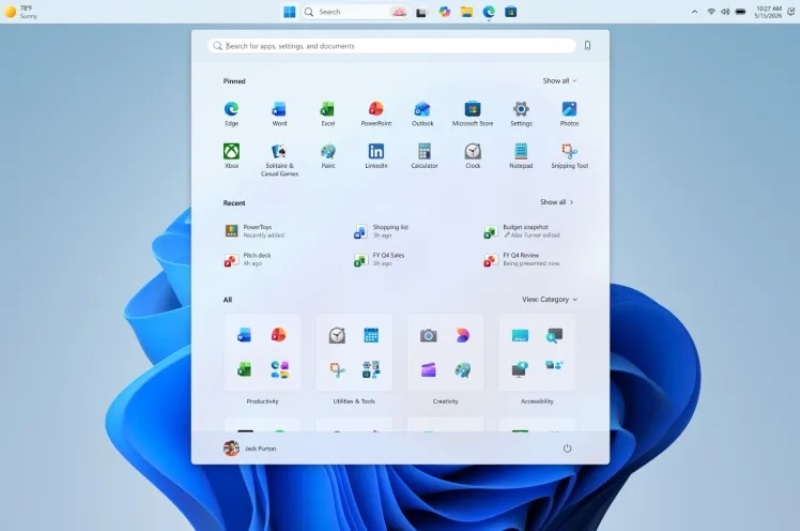
Microsoft will allow moving the taskbar and resizing the Start menu in Windows 11
New Interface Features in the Windows 11 Test Build
Microsoft recently added several long‑awaited features to one of the latest “Experimental” builds of Windows 11 available to participants of the Windows Insider program. Below is a brief overview of what can now be changed and how it works.
| What Changed | How It Looks |
|---|---|
| Taskbar Position | Users can place the taskbar at the bottom, top, left, or right side of the screen. A new setting also allows aligning icons within the taskbar. |
| Taskbar Size | The ability to reduce the width/height of the taskbar, which is handy for devices with small screens. |
| Start Menu | Users can now choose between a “small” and a “large” layout. New toggles let you hide or reveal individual sections: |
| User Profile | In the Start menu, you can hide your name and avatar, which is convenient when sharing your screen. |
How It Works
- Regardless of the taskbar position chosen, users can always open the main Start menu.
- When the taskbar size is reduced, all functionality remains available but takes up less space.
- The toggles in the menu settings let you quickly adapt the interface to your habits: hide unnecessary sections or keep only the most frequently used ones.
Where and When They Will Appear
These features are already available in the “Experimental” channel of Windows Insider. Over the coming weeks they will be gradually rolled out into beta versions of Windows 11. It is still unknown exactly when they will become part of stable OS builds.
Thus, the test build offers users more flexible UI settings, making computer use more convenient and personalized.
 Asted Cloud
Comments (0)
Share your thoughts — please be polite and stay on topic.
Log in to comment