
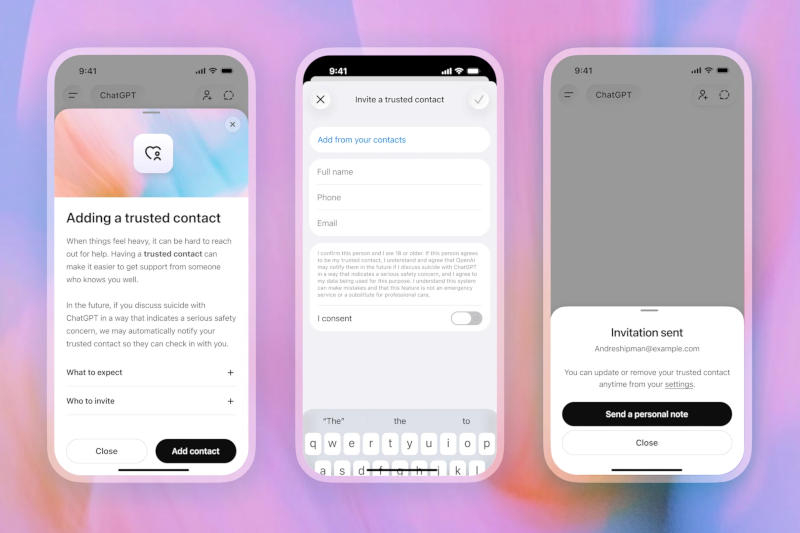
ChatGPT now has a “trusted contact” that will notify the user of intentions to harm themselves
New “Trusted Contact” Feature in ChatGPT
OpenAI has added the ability for adult users (18 years and older—19 years in South Korea) to specify a person in their account settings whom the company will contact in case of an emergency related to mental health or safety.
How It Works
1. Selecting a Contact
The user can add any other adult’s details (friend, relative, colleague, etc.) in the “Settings” section of their account.
2. Invitation
After the contact receives a request from ChatGPT, they have one week to accept the invitation. They can also decline the role of trusted contact at any time.
3. Notification
If the system detects conversations about self-harm or suicide, ChatGPT will advise the user to reach out to their trusted person and inform them that this individual will receive a notification.
4. Incident Handling
The case will be reviewed by a small team of specially trained OpenAI staff. After verification, the company will send the trusted contact a brief message (via email, SMS, or the ChatGPT app, if configured) warning of serious safety concerns.
5. Privacy
The notification is limited: the trusted contact will not receive fragments of the conversation, only a general notice that intervention is needed.
What This Means for Users
- The “Trusted Contact” feature provides an additional layer of support alongside existing help lines in ChatGPT.
- Enabling it is optional; any adult user can turn this option on or off at any time.
- In a crisis, the system will automatically forward information to the chosen person so they can offer assistance.
Thus, OpenAI strengthens its user support mechanism by giving users the ability to quickly contact a close person when a mental health threat arises.
 Asted Cloud
Comments (0)
Share your thoughts — please be polite and stay on topic.
Log in to comment